
3D design at a glance:
- 3D Design allows engineers and designers to create detailed models for digital manufacturing.
- Exist 3 types main 3d design :
- modeling solidă,
- modeling of area
- modeling of tip sculpture.
1. Solid Modeling
Solid modeling or solid modeling is a technique in which 3D models are created as if they were real parts, with a workflow similar to the processes used in traditional manufacturing. It starts with a solid block of material, from which sections are added or removed to produce the final shape.
Various operations, such as extrusions, cuts, rotations, are used to elaborate the design. A major advantage of solid modeling is that it is usually parametric, which means that changes or dimensions are saved at each step of the modeling process (ordering) and can be edited at any time in the design phase, allowing the model to update dynamically.
Among the most popular cad programs for solid or parametric modeling are:
Most used programs for solid modeling
| CAD Program | Main use | Common industries | Free |
|---|---|---|---|
| Autodesk AutoCAD | 2D and 3D design | Architecture, Engineering, Industrial Design | No |
| SolidWorks | Parametric solid modeling | Mechanical Engineering, Industrial Design | No |
| PTC Creo (Pro/ENGINEER) | 3D Design | Manufacturing, Engineering | No |
| CATIA | Advanced design and simulation | Aerospace, Automotive | No |
| Siemens NX (formerly Unigraphics NX) | Design, engineering and manufacturing | Various industries requiring solid and surface modeling | No |
| Autodesk Inventor | Mechanical and industrial design | Mechanical Design, Industrial Design | No |

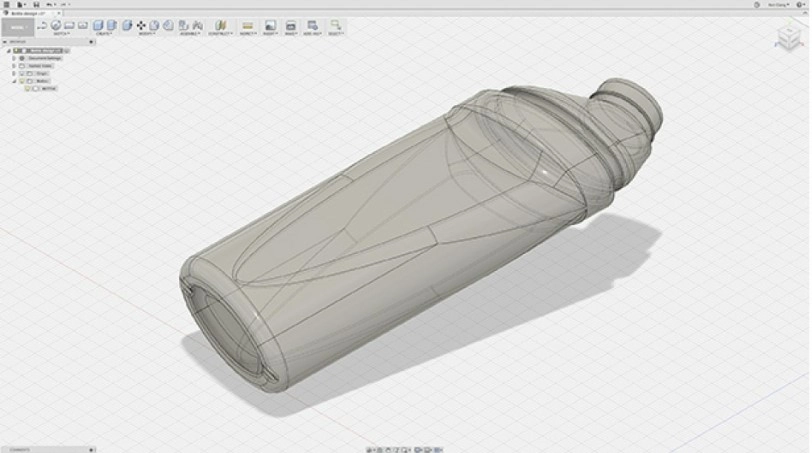
2. Surface Modeling
Surface Modeling or Surface Modeling is ideal for designing organic shapes and is much simpler for creating complex geometries, such as the body of a car or the wing of an airplane.
Although solid modeling is based on operations in three dimensions and with exact dimensions in mm, creating complex curves can be difficult with solid modeling. Surface modeling places a series of points over a surface, allowing their manipulation to form a particular design.
While this gives more freedom in design, lack of constraints can lead to problems with part accuracy or manufacturability.
Among the most popular cad programs for surface modeling are:
Popular surface modeling programs.
| Surface Modeling Software | Industries | Free |
|---|---|---|
| Autodesk Alias | Automotive, Industrial Design | No |
| Rhinoceros (Rhino) | Architecture, Industrial Design, Jewelry | No |
| SOLIDWORKS | Various Industries | No |
| CATIA | Aerospace, Automotive | No |
| Siemens NX | Various Industries | No |
| Autodesk Fusion 360 | Various Industries | Partially |
| PTC Creo | Engineering, Production | No |
| Autodesk Inventor | Mechanical Design, Industrial Engineering | No |
| Onshape | Engineering, Product Design | Partially |
| Solid Edge | Engineering, Production | No |
| SketchUp | Architecture, Interior Design | Partially |
| ZBrush | Gaming, Movies, 3D Printing | No |
3. Sculpture
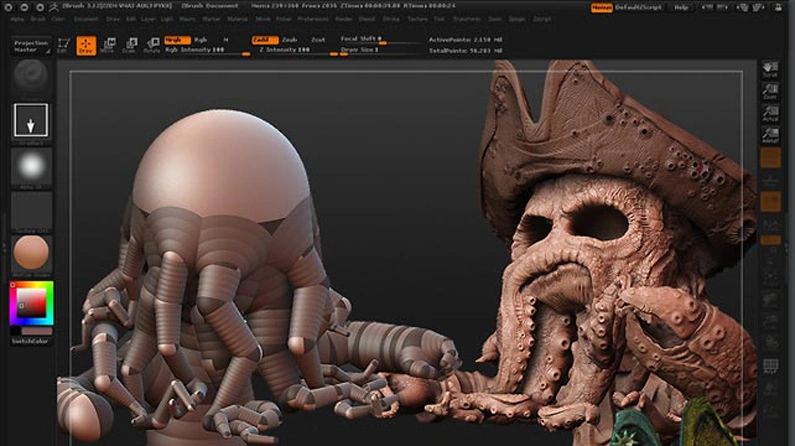
Sculpting, Sculpting or Organic modeling also known as organic modeling, is mainly used to create loose surfaces with intricate details, such as characters, jewelry or organic shapes found in nature, such as trees or rock formations.
SSculpting tools allow digital sculptors to start with a simulated ball of clay and use a tablet or pressure-sensitive monitor to manipulate the object.
The design process is completed with digital brushes that mirror classic sculpting tools.
Among the most popular cad programs for sculpting are:
Most Used Sculpting Programs
| Program Name | Used For | Free |
|---|---|---|
| ZBrush | Detailed carving for movies and games | No |
| Mudbox | 3D sculpting and painting tool | No |
| Blender | Open-source 3D creation suite | From |
| 3D-Coat | Sculpture, retopology and texturization | No |
| Sculptris | Accessible sculpture program for beginners | From |
Short demonstration video
Conclusion
There is a wide range of CAD programs available, each tailored for different industries, all capable of exporting STL or OBJ files for 3D printing or STEP and IGES files for CNC manufacturing.
So, no matter how complex your project is, there's definitely a CAD tool to help you materialize it.
I hope this introduction to 3D design has been useful and whetted your appetite for more knowledge in this exciting field.
I invite you to explore more and let your creativity shape the future!
I'm sure you will find more interesting information and inspiration in this exciting area of 3D design.
Follow blog our for more on advanced design methods and practical applications of 3D modeling.
